Incidence Rates Table
Quick Reference Guide
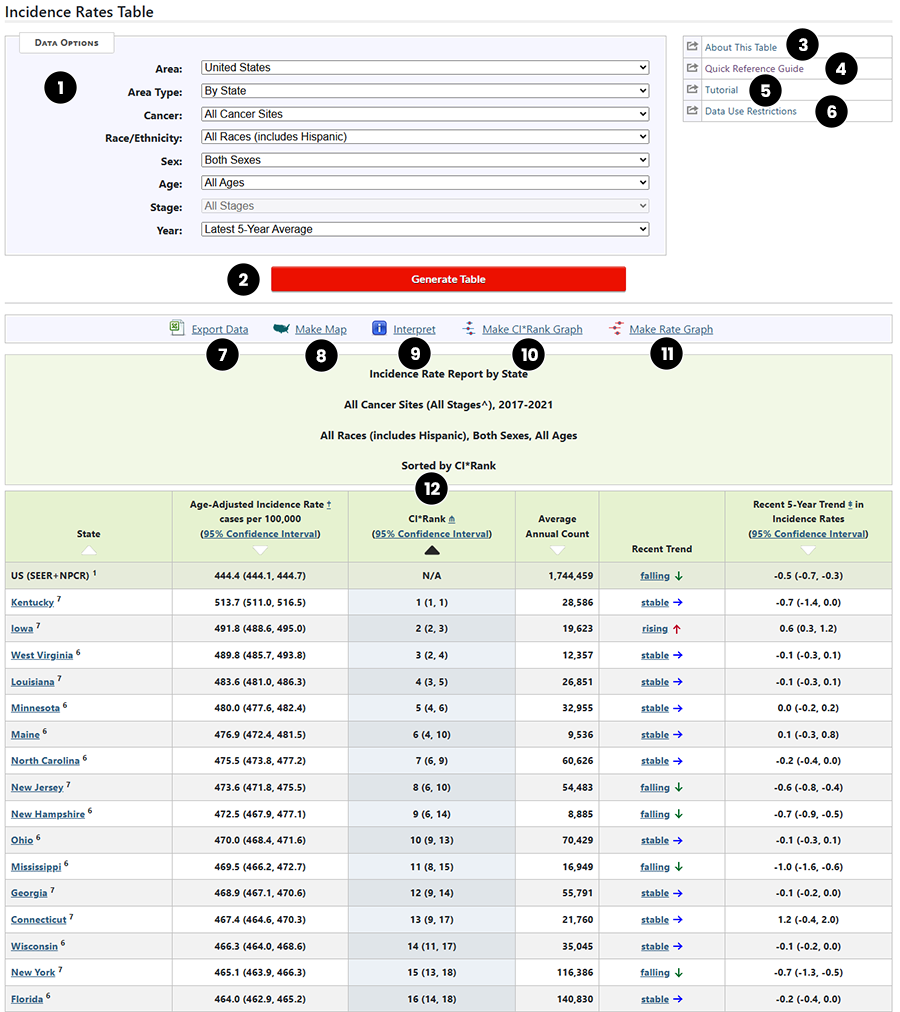
This graphic shows the Incidence Rate Report for the United States by state.
- Selection Box - this box allows you to select the data that you would like to see in the table.
- Generate Table (button) - creates a table based on the data selected above.
- About this Table (link) - displays the text description for this table type.
- Quick Reference Guide (link) - displays this printable guide.
- Tutorial (link) - displays a list of tutorials and demos available for this table.
- Data Use Restrictions (link) - links to an explanation of the restrictions for using this table.
- Export Data (link) - creates a file in a format ready to export to other applications.
- Make Map (link) - creates a map of the incidence rates displayed on the table.
- Interpret (link) - displays a text description of the table.
- Make CI*Rank Graph (link) - generates a graph of the locations ranked by confidence interval.
- Make Rate Graph (link) - generates a graph of the incidence rates by location.
- Triangles (icon) - Click on the triangle to sort by this column. The triangle turns black. Click again to reverse the order (ascending or descending) in which the data are sorted.